Integration-03 Fortran Application Development
ALPS Fortran provides Fortran interface modules for the ALPS system. By implementing a small, fixed set of required subroutines, you can run a Fortran program under the ALPS scheduler and take advantage of its parallelization, parameter management, and result-aggregation features — the same benefits demonstrated in C++ in Integration-00 and used to build the “hello” sample in Integration-02. This chapter documents that subroutine interface in full, and works through a complete, realistic example: porting a pre-existing, unmodified Fortran program — a two-dimensional Ising model Monte Carlo simulation, written in 1993 — into the ALPS Fortran framework.
Introduction to ALPS Fortran
The following figure shows the relationship between the ALPS system, ALPS Fortran, and a user Fortran program.
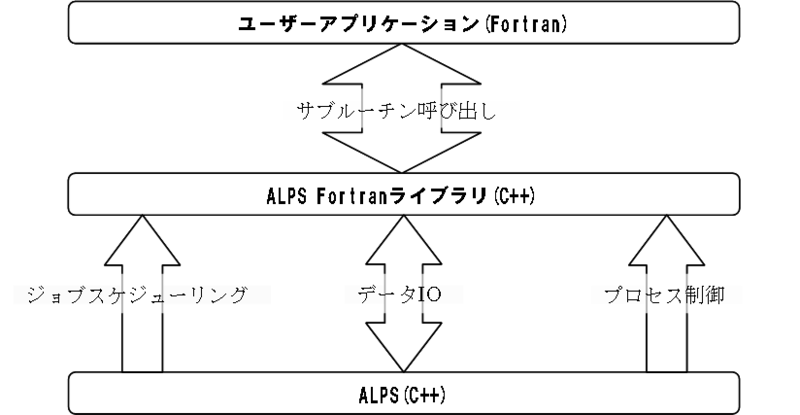
ALPS Fortran is a thin C++ layer that sits between the C++ ALPS scheduler and your Fortran code. ALPS calls into ALPS Fortran using ordinary C++, and ALPS Fortran in turn calls the Fortran subroutines of your program as plain Fortran subroutine calls — this is what allows ALPS to control a Fortran program (job scheduling, checkpointing, process control) in exactly the same way it controls a C++ Worker class, as in Integration-00, Step 9. ALPS Fortran also provides the reverse path: a set of subroutines (alps_get_parameter, alps_accumulate_observable, …) that let your Fortran code call back into ALPS as if those were ordinary Fortran subroutines, so you never need to write or call any C++ yourself.
Call Flow
The following figure shows the call flow between the ALPS system and the user program over the lifetime of a run, in three phases: initialization, the computation loop, and finalization.
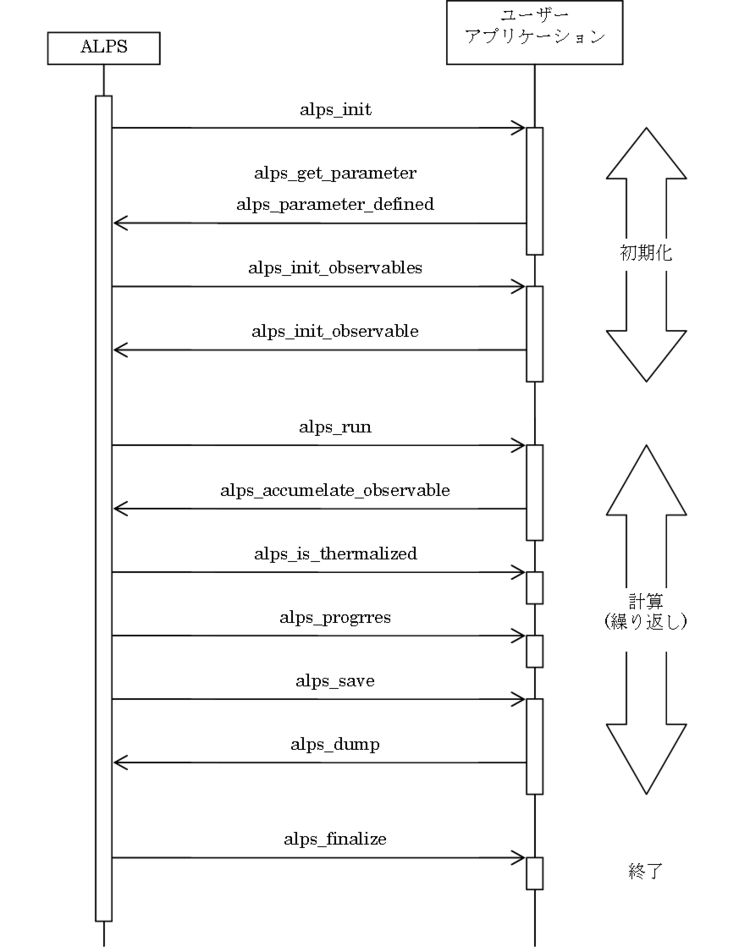
During initialization, ALPS calls alps_init once, during which your code typically calls back into alps_get_parameter and alps_parameter_defined to read its parameters, then ALPS calls alps_init_observables, during which your code calls alps_init_observable to register each measurement. ALPS then repeatedly calls alps_run — the actual computation — interleaved with alps_is_thermalized and alps_progress, until progress reaches 1.0; each alps_run call typically calls back into alps_accumulate_observable to record its measurement. Finally, during finalization, ALPS calls alps_save (which calls alps_dump to write checkpoint data) and alps_finalize. The subroutine reference below documents every box in this diagram.
Readers who worked through Integration-00 will recognize this exact same three-phase structure — it is the same lifecycle as the wolff_worker C++ class from Step 9, just spread across Fortran subroutines instead of C++ member functions:
| ALPS Fortran subroutine | Equivalent C++ Worker method (Integration-00, Step 9) |
|---|---|
alps_init | constructor |
alps_init_observables | init_observables |
alps_run | run |
alps_progress | progress |
alps_is_thermalized | is_thermalized |
alps_save | save |
alps_load | load |
alps_finalize | destructor |
Preparing the Fortran Source Code
To implement a program using ALPS Fortran, you need to prepare two source files:
- A C++ source file that defines the
mainfunction (the entry point of the program). - A Fortran source file that implements the subroutines required by ALPS Fortran.
Entry Point
The main function sets program metadata such as the version number, copyright notice, worker name, and evaluator name. In most cases the body of main does not need to change — only the metadata strings need to be updated for your program.
The following is an example C++ entry point — this is, in fact, exactly what hello.C and ising.C from Integration-02 look like, just with the metadata strings and worker name shown as placeholders instead of "hello"/"ising":
#include <alps/parapack/parapack.h>
#include "alps/fortran/fortran_wrapper.h"

// Version number
PARAPACK_SET_VERSION("my version");

// Copyright notice
PARAPACK_SET_COPYRIGHT("my copyright");

// Worker name
PARAPACK_REGISTER_WORKER(alps::fortran_wrapper, "worker name");

// Evaluator
PARAPACK_REGISTER_EVALUATOR(alps::parapack::simple_evaluator, "evaluator name");

int main(int argc, char** argv)
{
    return alps::parapack::start(argc, argv);
}
Replace the example strings ("my version", "my copyright", "worker name", "evaluator name") with values appropriate for your program. alps::fortran_wrapper is the ALPS-provided Worker class that makes this work: it is a C++ class satisfying the same Worker interface built by hand in Integration-00, Step 9, but instead of implementing run, is_thermalized, and so on directly in C++, it forwards each call to the Fortran subroutines you implement below.
Fortran Source Code
The main content of the Fortran source file is the calculation logic. However, you must always implement a set of required subroutines so that ALPS Fortran can control your program. When loading parameters or saving results, you call subroutines provided by ALPS Fortran rather than handling I/O directly.
Required Subroutines
The following subroutines must be present in the Fortran source file. If any are missing, the build will fail with a link error.
Every required subroutine receives caller as an argument — an integer array used internally by ALPS Fortran to invoke ALPS functions. Do not modify the value of caller. Undefined behaviour results if its value is changed.
Each subroutine must include alps/fortran/alps_fortran.h:
subroutine alps_init(caller)
implicit none
include "alps/fortran/alps_fortran.h"
integer :: caller(2)

! --- your code here --- !
alps_init(caller)
| Type | Name | I/O | Meaning |
|---|---|---|---|
| integer | caller(2) | in | internal ALPS handle — do not modify |
Called once before the calculation begins. Use this subroutine for initialization: allocate arrays and read parameters.
alps_init_observables(caller)
| Type | Name | I/O | Meaning |
|---|---|---|---|
| integer | caller(2) | in | internal ALPS handle |
Called once after alps_init. Use this subroutine to register the observables (measurement quantities) with alps::ObservableSet. Called once per set of input parameters. See the ALPS documentation for details on alps::ObservableSet.
alps_run(caller)
| Type | Name | I/O | Meaning |
|---|---|---|---|
| integer | caller(2) | in | internal ALPS handle |
Contains the core calculation logic. ALPS calls this subroutine repeatedly until alps_progress returns a value ≥ 1.0. Because ALPS manages the iteration loop, do not write an outer loop inside alps_run. When running with thread-level parallelism, this subroutine executes on multiple threads simultaneously and must be thread-safe.
alps_progress(prgrs, caller)
| Type | Name | I/O | Meaning |
|---|---|---|---|
| real*8 | prgrs | out | progress indicator (0.0 ≤ prgrs; calculation ends when prgrs ≥ 1.0) |
| integer | caller(2) | in | internal ALPS handle |
Called by ALPS after each call to alps_run. While prgrs < 1.0, ALPS continues calling alps_run. When prgrs ≥ 1.0, ALPS considers the calculation complete and stops. Must be thread-safe when running with thread-level parallelism.
alps_is_thermalized(thrmlz, caller)
| Type | Name | I/O | Meaning |
|---|---|---|---|
| integer | thrmlz | out | thermalization flag: 0 = not yet thermalized, 1 = thermalized |
| integer | caller(2) | in | internal ALPS handle |
Called by ALPS after each alps_run. While thrmlz = 0, ALPS does not save measurement results (the system is still thermalizing). When thrmlz = 1, ALPS begins saving results. Must be thread-safe when running with thread-level parallelism.
alps_finalize(caller)
| Type | Name | I/O | Meaning |
|---|---|---|---|
| integer | caller(2) | in | internal ALPS handle |
Called once after alps_progress returns a value ≥ 1.0. Use this subroutine for cleanup: deallocate arrays and release any other resources.
alps_save(caller)
| Type | Name | I/O | Meaning |
|---|---|---|---|
| integer | caller(2) | in | internal ALPS handle |
Called by ALPS after each alps_run. Write checkpoint data to the restart file using alps_dump. Must be thread-safe when running with thread-level parallelism.
alps_load(caller)
| Type | Name | I/O | Meaning |
|---|---|---|---|
| integer | caller(2) | in | internal ALPS handle |
Called once when the program is restarted. Load checkpoint data from the restart file using alps_restore.
Subroutines Provided by ALPS Fortran
To call ALPS functions from your Fortran program, use the subroutines provided by ALPS Fortran. Each takes caller(2) as a parameter; pass the caller variable received by the enclosing required subroutine.
The data type constants referenced in the tables below are defined in alps_fortran.h: ALPS_CHAR (a string, e.g. for reading a text-valued parameter such as WORLD in Integration-02), ALPS_INT, ALPS_LONG, ALPS_REAL, and ALPS_DOUBLE_PRECISION.
alps_get_parameter(data, name, type, caller)
| Type | Name | I/O | Meaning |
|---|---|---|---|
| — | data | out | variable to receive the parameter value |
| character | name(*) | in | parameter name |
| integer | type | in | data type constant (defined in alps_fortran.h) |
| integer | caller(2) | in | internal ALPS handle |
Reads a named parameter from the ALPS parameter file into data. Typically called inside alps_init. The available type constants are defined in alps_fortran.h.
alps_parameter_defined(res, name, caller)
| Type | Name | I/O | Meaning |
|---|---|---|---|
| integer | res | out | 1 if the parameter is defined, 0 if not |
| character | name(*) | in | parameter name |
| integer | caller(2) | in | internal ALPS handle |
Returns whether the named parameter is present in the parameter file. Typically used in alps_init to handle optional parameters.
alps_init_observable(count, type, name, caller)
| Type | Name | I/O | Meaning |
|---|---|---|---|
| integer | count | in | number of elements in the observable |
| integer | type | in | data type constant |
| character | name(*) | in | name to register the observable under |
| integer | caller(2) | in | internal ALPS handle |
Registers a named observable with alps::ObservableSet inside alps_init_observables. The observable type is determined by type and count:
| type | count | Observable type |
|---|---|---|
| ALPS_INT | 1 | IntObservable |
| ALPS_INT | > 1 | IntVectorObservable |
| ALPS_REAL | 1 | RealObservable |
| ALPS_REAL | > 1 | RealVectorObservable |
| ALPS_DOUBLE_PRECISION | 1 | RealObservable |
| ALPS_DOUBLE_PRECISION | > 1 | RealVectorObservable |
alps_accumulate_observable(data, count, type, name, caller)
| Type | Name | I/O | Meaning |
|---|---|---|---|
| — | data | in | value(s) to record |
| integer | count | in | number of elements |
| integer | type | in | data type constant |
| character | name(*) | in | name of the observable to store into |
| integer | caller(2) | in | internal ALPS handle |
Records a measurement result into a named observable. Called inside alps_run. The count, type, and name must match those used in alps_init_observable.
alps_dump(data, count, type, caller)
| Type | Name | I/O | Meaning |
|---|---|---|---|
| — | data | in | data to save |
| integer | count | in | number of elements |
| integer | type | in | data type constant |
| integer | caller(2) | in | internal ALPS handle |
Writes data to the restart file. Called inside alps_save. Data saved with alps_dump must be restored in the same order using alps_restore.
alps_restore(data, count, type, caller)
| Type | Name | I/O | Meaning |
|---|---|---|---|
| — | data | out | storage location for loaded data |
| integer | count | in | number of elements |
| integer | type | in | data type constant |
| integer | caller(2) | in | internal ALPS handle |
Reads data from the restart file. Called inside alps_load. Data must be restored in the same order it was saved by alps_dump.
Editing the CMakeLists.txt
User programs are built with CMake, just like ALPS itself — see Integration-01 for a general explanation of how ALPS’s CMake integration works. Below is a sample CMakeLists.txt, following the same pattern used throughout Integration-00 and Integration-02, extended with Fortran support. Replace myproject, main.C, and myprogram_impl.f90 with the actual names for your project:
cmake_minimum_required(VERSION 3.18 FATAL_ERROR)
project(myproject NONE)

# find ALPS Library
find_package(ALPS REQUIRED PATHS ${ALPS_ROOT_DIR} $ENV{ALPS_HOME} NO_SYSTEM_ENVIRONMENT_PATH)
message(STATUS "Found ALPS: ${ALPS_ROOT_DIR} (revision: ${ALPS_VERSION})")
include(${ALPS_USE_FILE})

# enable C, C++, and Fortran compilers
enable_language(C CXX Fortran)

# rule for generating the program
add_executable(myprogram main.C myprogram_impl.f90)
target_link_libraries(myprogram ${ALPS_LIBRARIES} ${ALPS_FORTRAN_LIBRARIES})enable_language(... Fortran) and PATHS ${ALPS_ROOT_DIR} $ENV{ALPS_HOME} — without them, CMake will not enable a Fortran compiler at all, or (without NO_SYSTEM_ENVIRONMENT_PATH’s companion PATHS argument) may fail to locate ALPS. See Integration-01 for why each line here matters.Porting an Existing Fortran Program
This section walks through porting the Ising model program ising_original.f to ALPS Fortran. All the files used here are part of the tutorials/alpsize-11-fortran-ising directory in the ALPS repository — the same repository the C++ tutorials in Integration-00 come from.
Preparing for the Port
Copy the following files from the tutorial directory to your working directory:
ising_original.f— original source codetemplate.f90— ALPS Fortran program templateising.C— entry point (identical in structure to thehello.Centry point from Integration-02, just with"ising"as the worker/evaluator name)CMakeLists.txt— build configuration template
template.f90 contains stub definitions of all required subroutines. For a new program, start from template.f90 rather than writing the subroutines from scratch.
The structure of the original code is:
| Lines | Processing |
|---|---|
| 5–9 | Variable declaration and initialization |
| 10–25 | Array element initialization |
| 26–49 | Main loop |
| 27–36 | Calculation |
| 38 | Thermalization check |
| 39–48 | Saving results |
| 50–60 | Results output |
Porting the Fortran Code
Each block of ising_original.f is assigned to a corresponding ALPS Fortran subroutine. The file ising_impl.f90 is the completed ported version.
Variable Declaration
Variables declared in ising_original.f must be moved into an ALPS Fortran module so they are accessible from multiple subroutines.
Before porting:
6    DIMENSION IS(20,20),IP(20),IM(20),P(-4:4),A(4)
7    C PARAMETERS
8          DATA TEMP/2.5/, L/10/, MCS/1000/, INT/1000/
9          DATA IX/1234567/, V0/.465661288D-9/
After porting:
module ising_mod
  implicit none
  real, parameter :: V0 = .465661288D-9

  integer, allocatable, dimension(:) :: IP, IM
  integer, allocatable, dimension(:,:) :: IS
  real*8, allocatable, dimension(:) :: P
  integer :: K, MCS, INT, L, IX
  real :: TEMP
end module ising_mod
IP, IM, IS, and P are allocated in alps_init, so their sizes are not fixed here. Array A (which stored accumulated results) is replaced by ALPS observables and is no longer needed. Variable values are read from the parameter file at runtime. K is added to count iterations; the thermalization check after porting is handled by monitoring K rather than using a loop with GOTO. (The !$omp threadprivate line is added later, in Multi-thread Support — the version of ising_impl.f90 actually shipped in the tutorial already includes it, since it ships the finished, thread-safe program.)
Note: the MPI version of this example does not need to be thread-safe, so thread safety is not considered here.
Initialization
The initialization block of the original code (array setup) becomes alps_init. Parameters are read from the parameter file via alps_get_parameter, and observables for storing results are registered in alps_init_observables. ALPS calls these subroutines automatically — you do not call them yourself.
Before porting:
10   C TABLES
11         DO 10 I=-4,4
12         W=EXP(FLOAT(I)/TEMP)
13    10   P(I)=W/(W+1/W)
14         DO 11 I=1,L
15         IP(I)=I+1
16    11   IM(I)=I-1
17         IP(L)=1
18         IM(1)=L
19   C INITIAL CONFIGURATION
20         DO 20 I=1,L
21         DO 20 J=1,L
22    20   IS(I,J)=1
23   C ACCUMULATION DATA RESET
24         DO 21 I=1,4
25    21   A(I)=0.0
After porting (
alps_init):subroutine alps_init(caller) use ising_mod implicit none include "alps/fortran/alps_fortran.h" integer :: caller(2) integer :: i, j real*8 :: W call alps_get_parameter(TEMP, "TEMPERATURE", ALPS_REAL, caller) call alps_get_parameter(L, "L", ALPS_INT, caller) call alps_get_parameter(MCS, "MCS", ALPS_INT, caller) call alps_get_parameter(INT, "INT", ALPS_INT, caller) allocate( IP(L) ) allocate( IM(L) ) allocate( P(-4:4) ) allocate( IS(L, L) ) K = 0 IX = 1234567 do i = -4, 4 W = exp(float(i)/TEMP) P(i) = W / (W + 1/W) end do do i = 1, L IP(i) = i + 1 IM(i) = i - 1 end do do i = 1, L do j = 1, L IS(i, j) = 1 end do end do IP(L) = 1 IM(1) = L return end subroutine alps_init
The calls to alps_get_parameter at the top read the values that used to be hard-coded DATA statements from the ALPS parameter file instead. The array setup that follows is otherwise identical to the original code.
alps_init actually shipped in ising_impl.f90 also calls omp_get_thread_num() and prints the thread ID and the parameters it just read, e.g. ----- alps_init( 2 ) -----. This is a small diagnostic aid for confirming — once you get to Multi-thread Support below — that clones really are running on separate threads; it is omitted here for clarity but is harmless to add to your own code.After porting (
alps_init_observables):subroutine alps_init_observables(caller) implicit none include "alps/fortran/alps_fortran.h" integer :: caller(2) call alps_init_observable(1, ALPS_REAL, "Energy", caller) call alps_init_observable(1, ALPS_REAL, "Magnetization", caller) return end subroutine alps_init_observables
Observables named "Energy" and "Magnetization" are registered as buffers for the results. In the original code, sums and sums of squares were accumulated manually in array A; after porting, alps_accumulate_observable handles this automatically.
Calculation and Saving Results
The original code uses a DO loop to iterate. After porting, alps_run performs one iteration per call — ALPS manages the loop by repeatedly calling alps_run until alps_progress returns ≥ 1.0.
Before porting:
26   C SIMULATION
27         DO 30 K=1,MCS+INT
28         KIJ=0
29         DO 31 I=1,L
30         DO 31 J=1,L
31         M=IS(IP(I),J)+IS(I,IP(J))+IS(IM(I),J)+IS(I,IM(J))
32         KIJ=KIJ+1
33         IS(I,J)=-1
34         IX=IAND(IX*5*11,2147483647)
35         IF(P(M).GT.V0*IX) IS(I,J)=1
36    31   CONTINUE
37   C DATA
38         IF(K.LE.INT) GOTO 30
39         EN=0
40         MG=0
41         DO 40 I=1,L
42         DO 40 J=1,L
43         EN=EN+IS(I,J)*(IS(IP(I),J)+IS(I,IP(J)))
44    40   MG=MG+IS(I,J)
45         A(1)=A(1)+EN
46         A(2)=A(2)+EN**2
47         A(3)=A(3)+MG
48         A(4)=A(4)+MG**2
49    30   CONTINUE
After porting (
alps_run):subroutine alps_run(caller) use ising_mod implicit none include "alps/fortran/alps_fortran.h" integer :: caller(2) integer :: i, j, M real*8 :: EN, MG do i = 1, L do j = 1, L M = IS(IP(i), j) + IS(i, IP(j)) + IS(IM(i), j) + IS(i, IM(j)) IS(i, j) = -1 IX = IAND(IX * 5 * 11, 2147483647) if(P(M).gt.V0*IX) IS(i, j) = 1 end do end do EN = 0.0D0 MG = 0.0D0 do i = 1, L do j = 1, L EN = EN + IS(i, j) * (IS(IP(i), j) + IS(i, IP(j))) MG = MG + IS(i, j) end do end do call alps_accumulate_observable(EN, 1, & ALPS_DOUBLE_PRECISION, "Energy", caller) call alps_accumulate_observable(MG, 1, & ALPS_DOUBLE_PRECISION, "Magnetization", caller) K = K + 1 return end subroutine alps_run
The calculation loops are identical to the original. The outer DO 30 K=1,MCS+INT loop is gone — ALPS calls alps_run repeatedly instead, and K = K + 1 at the end tracks how many times it has been called. The calls to alps_accumulate_observable record results directly; the summation and squaring done manually in the original (into A(1)–A(4)) is handled automatically by the observable.
After porting (
alps_progress):subroutine alps_progress(prgrs, caller) use ising_mod implicit none include "alps/fortran/alps_fortran.h" integer :: caller(2) real*8 :: prgrs prgrs = K / (INT + MCS) end subroutine alps_progress
alps_progress controls when iteration stops. Once prgrs ≥ 1.0 (i.e., K ≥ INT + MCS), ALPS stops calling alps_run.
Thermalization Check
In the original code, the thermalization check is embedded in the main loop. After porting it becomes a separate subroutine.
Before porting:
38 IF(K.LE.INT) GOTO 30After porting (
alps_is_thermalized):subroutine alps_is_thermalized(thrmlz, caller) use ising_mod implicit none include "alps/fortran/alps_fortran.h" integer :: caller(2) integer :: thrmlz if(K >= INT) then thrmlz = 1 else thrmlz = 0 end if return end subroutine alps_is_thermalized
As with alps_progress, the thermalization state is determined from the iteration counter K. When thrmlz = 1, ALPS begins saving measurement results.
Output and Post-processing
When using ALPS, output and post-processing are handled automatically. The output code in the original program is not needed after porting.
Before porting:
50   C STATISTICS
51         DO 50 I=1,4
52    50   A(I)=A(I)/MCS
53         C=(A(2)-A(1)**2)/L**2/TEMP**2
54         X=(A(4)-A(3)**2)/L**2/TEMP
55         ENG=A(1)/L**2
56         AMG=A(3)/L**2
57         WRITE(6,100) TEMP,L,ENG,C,AMG,X
58    100  FORMAT(' TEMP=',F10.5,' SIZE=',I5,
59        * /' ENG =',F10.5,' C   =',F10.5,
60        * /' MAG =',F10.5,' X   =',F10.5)
After porting: no code required. The scheduler collects the
EnergyandMagnetizationobservables and writes standard ALPS result files automatically — see Running the Ported Program below.
Finalization
The original code has no explicit cleanup because it uses static arrays. After porting, dynamically allocated arrays must be deallocated in alps_finalize.
Before porting: no code required.
After porting (
alps_finalize):subroutine alps_finalize(caller) use ising_mod implicit none include "alps/fortran/alps_fortran.h" integer :: caller(2) deallocate(IP) deallocate(IM) deallocate(P) deallocate(IS) return end subroutine alps_finalize
Restart Support
Implementing alps_save and alps_load adds checkpoint/restart capability. The original code has no restart support; the example below shows how to add it.
Before porting: no code required.
After porting (
alps_save):subroutine alps_save(caller) use ising_mod implicit none include "alps/fortran/alps_fortran.h" integer caller(2) call alps_dump(K, 1, ALPS_INT, caller) call alps_dump(IX, 1, ALPS_INT, caller) call alps_dump(IS, L * L, ALPS_INT, caller) return end subroutine alps_save
Only the variables needed to resume computation (K, IX, IS) are saved.
After porting (
alps_load):subroutine alps_load(caller) use ising_mod implicit none include "alps/fortran/alps_fortran.h" integer :: caller(2) call alps_restore(K, 1, ALPS_INT, caller) call alps_restore(IX, 1, ALPS_INT, caller) call alps_restore(IS, L * L, ALPS_INT, caller) return end subroutine alps_load
Data must be restored in the same order it was saved. Note that when an ALPS program restarts, alps_init is called before alps_load, so memory allocation and variable initialization happen in alps_init as usual — alps_load only needs to restore the saved values.
Multi-thread Support
To run with thread-level parallelism, all module variables accessed by the parallel subroutines must be declared threadprivate. Add the following line to ising_mod:
After porting (multi-thread):
module ising_mod
  implicit none
  real, parameter :: V0 = .465661288D-9

  integer, allocatable, dimension(:) :: IP, IM
  integer, allocatable, dimension(:,:) :: IS
  real*8, allocatable, dimension(:) :: P
  integer :: K, MCS, INT, L, IX
  real :: TEMP
  !$omp threadprivate (K, MCS, INT, TEMP, IP, IM, P, IS, IX, L)
end module ising_mod
This is exactly the ising_mod shown in Variable Declaration above — ising_impl.f90 as shipped already includes this line, since the tutorial file shows the finished, thread-safe program rather than the intermediate single-threaded version.
About ising.C
The ising.C file provides the program entry point, exactly as described in Entry Point above. The body of main itself does not need to change; update only the metadata strings for your own program.
About CMakeLists.txt
Update CMakeLists.txt to match your own source file names, following the same pattern shown in Editing the CMakeLists.txt above — this is, in fact, exactly the real CMakeLists.txt used to build this tutorial:
cmake_minimum_required(VERSION 3.18 FATAL_ERROR)
project(alpsize NONE)

# find ALPS Library
find_package(ALPS REQUIRED PATHS ${ALPS_ROOT_DIR} $ENV{ALPS_HOME} NO_SYSTEM_ENVIRONMENT_PATH)
message(STATUS "Found ALPS: ${ALPS_ROOT_DIR} (revision: ${ALPS_VERSION})")
include(${ALPS_USE_FILE})

# enable C, C++, and Fortran compilers
enable_language(C CXX Fortran)

# rule for generating ising program
add_executable(ising ising.C ising_impl.f90)
target_link_libraries(ising ${ALPS_LIBRARIES} ${ALPS_FORTRAN_LIBRARIES})
Running the Ported Program
Build it the same way as the hello sample in Integration-02:
$ cmake -DALPS_ROOT_DIR=${ALPS_ROOT} .
$ make
The tutorial directory ships a ready-made ising_params parameter file with four clones, each at a different temperature, lattice size, and sweep count:
ALGORITHM = "ising"
{ TEMPERATURE = 2.5; MCS = 1000; INT = 1000; L=10; }
{ TEMPERATURE = 2.3; MCS = 900; INT = 1100; L=20; }
{ TEMPERATURE = 2.1; MCS = 800; INT = 1200; L=30; }
{ TEMPERATURE = 1.9; MCS = 700; INT = 1300; L=40; }
Convert it to XML and run, exactly as in Integration-02:
$ cp ${SAMPLES}/alpsize-11-fortran-ising/ising_params .
$ parameter2xml ising_params
$ ./ising ising_params.in.xml
Because alps_init and alps_finalize in the shipped ising_impl.f90 print a short diagnostic banner (see the callout in Initialization above), each clone announces itself as it starts and finishes, for example:
----- alps_init( 0 ) -----
   TEMP =  2.5000000000000000
   MCS =  1000
   INT =  1000
   L =  10
Once all four clones finish, ALPS writes the accumulated Energy and Magnetization observables — with automatic error bars, exactly as alps::alea provides in the C++ tutorials — to the standard ALPS result files, which you can inspect with the usual ALPS/pyalps tools referenced throughout the ALPS documentation.
What’s Next?
This completes the ALPS integration tutorial series. You have now seen the same underlying scheduler — parameters, observables, checkpointing, parallel clones — driven from plain C (Integration-00), explained at the build-system level (Integration-01), and driven from Fortran (Integration-02 and this page). Return to the Integration section overview for the full list of tutorials, or to the ALPS lattice library and Methods documentation to see what else ALPS can simulate once your own code is integrated.