Skip to content

Introduction

Specifying lattices and graphs within the ALPS framework

This section explains how lattices and graphs are specified within the ALPS framework. Specifying the lattice as part of the input file, rather than hard-coding it into the simulation program, means the same application can be reused unchanged across many different lattice geometries.

This page covers the following topics:

Existing lattices (graphs) in the ALPS lattice library

Most common lattices (graphs) at a glance
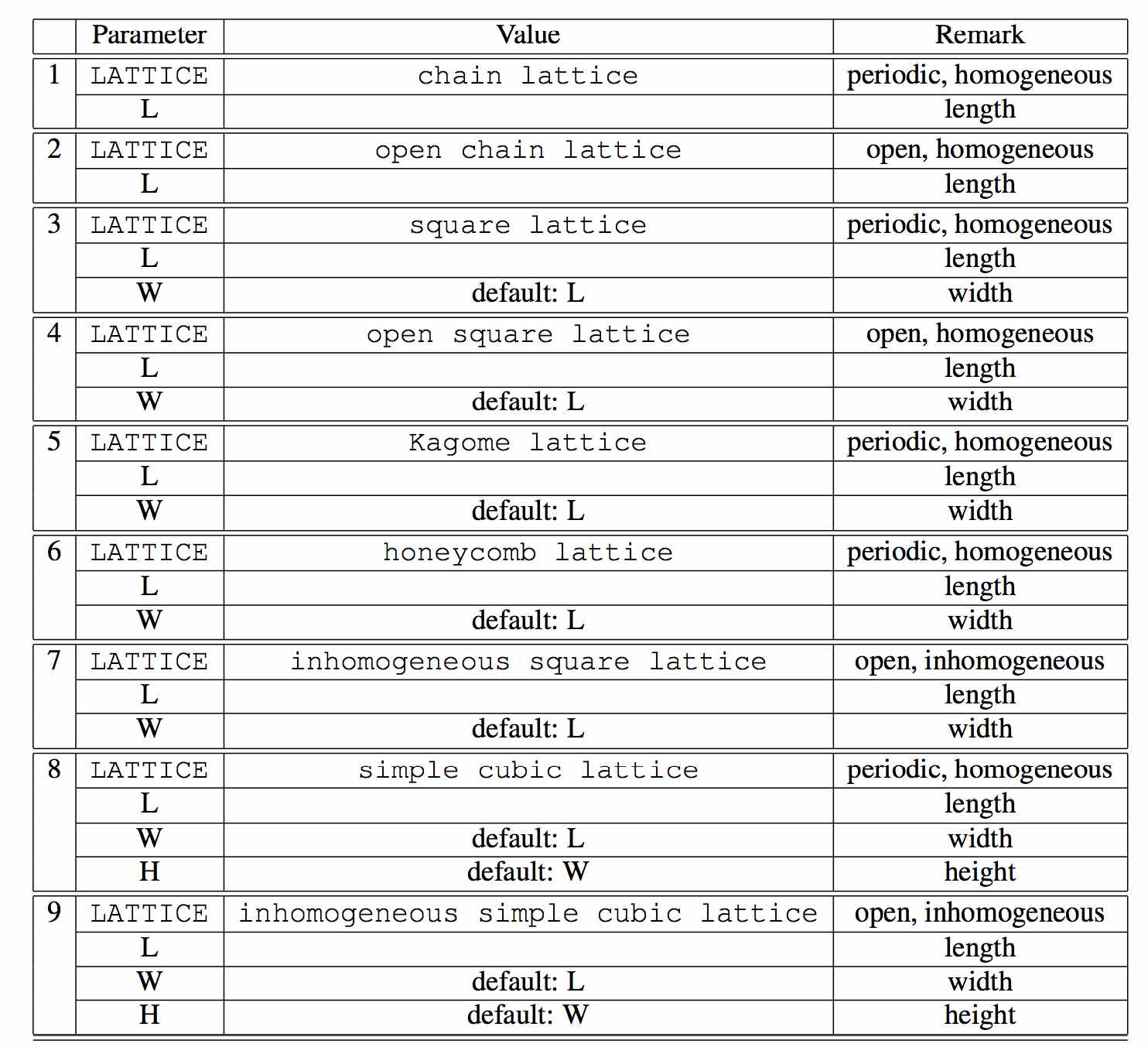
The nine most commonly used lattices are already built into the library and can be selected directly by name via the LATTICE parameter, without writing any XML yourself:

#LATTICEParametersRemark
1chain latticeL (length)periodic, homogeneous
2open chain latticeL (length)open, homogeneous
3square latticeL (length), W (width, default L)periodic, homogeneous
4open square latticeL (length), W (width, default L)open, homogeneous
5Kagome latticeL (length), W (width, default L)periodic, homogeneous
6honeycomb latticeL (length), W (width, default L)periodic, homogeneous
7inhomogeneous square latticeL (length), W (width, default L)open, inhomogeneous
8simple cubic latticeL (length), W (width, default L), H (height, default W)periodic, homogeneous
9inhomogeneous simple cubic latticeL (length), W (width, default L), H (height, default W)open, inhomogeneous

Common lattices (graphs) in ALPS

Entire archive of lattices (graphs)

The entire archive of the ALPS lattice library can be found in the XML file $ALPSPATH/lib/xml/lattices.xml.


For the LATTICE/GRAPH input parameters that select one of these lattices in a simulation, see Common Parameters. For an overview of the rest of this section, see Lattice Definitions. For the other ALPS documentation sections, see the General Introduction.