Lattice and Unit Cells
Lattice models are usually defined on either an infinite lattice or a finite piece of one. Here we explain how to specify both in XML format, starting from a unit cell and its basis vectors.
Infinite lattices
Lattices are created by replicating a unit cell through translation by integer multiples of the basis vectors of the lattice, as shown here in two dimensions:
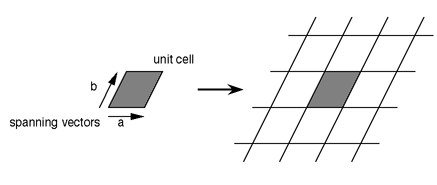
Such a lattice is described by an (optional) name and the dimensionality. Additionally, we can specify the Cartesian coordinates of the basis vectors of the lattice. For the above lattice this would be:
<LATTICE name="2D" dimension="2">
<BASIS>
    <VECTOR>   1 0 </VECTOR>
    <VECTOR> 0.5 1 </VECTOR>
</BASIS>
</LATTICE>
Basis vectors can also be specified in a symbolic and parametrized way, such as:
<LATTICE name="2D" dimension="2">
<PARAMETER name="a" default="1"/>
<PARAMETER name="b" default="1"/>
<PARAMETER name="phi" default="Pi/2"/>
<BASIS>
    <VECTOR>   a 0 </VECTOR>
    <VECTOR> b*cos(phi) b*sin(phi) </VECTOR>
</BASIS>
</LATTICE>
With the default values shown, this gives the same square lattice as a concrete, non-parametrized phi=Pi/2 would: the first vector along the x-axis and the second, of length b, at an angle phi to it.
Finite lattices
Finite extent
Most (but not all) computer simulations do not work on the infinite lattice presented above, but instead on a finite part of the lattice. There are many ways in which such a finite lattice can be defined; any finite subset of a lattice is itself a finite lattice, so the possibilities are infinite. To start with, we define the most widespread lattice of finite extent, where a cell is translated at most a finite number of times in any direction — for example a square, rectangular, cubic, or hypercubic lattice — and we specify the extent in each dimension.
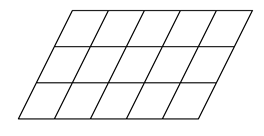
To create a finite lattice, one defines:
<FINITELATTICE name="5x3">
<LATTICE name="2D" dimension="2"/>
<EXTENT dimension="1" size="5"/>
<EXTENT dimension="2" size="3"/>
</FINITELATTICE>
If the dimension attribute is omitted, the extent is assumed to apply to all dimensions, e.g. a cubic lattice of linear size 4 would be:
<FINITELATTICE>
<LATTICE dimension="3"/>
<EXTENT size="4"/>
</FINITELATTICE>
Not all dimensions need to be finite, and an infinite strip of width two can be specified as:
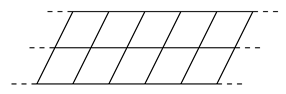
<FINITELATTICE name="strip">
<LATTICE name="2D" dimension="2"/>
<EXTENT dimension="2" size="2"/>
</FINITELATTICE>
In many applications, the exact extent is not constant, but is instead an input parameter specified by the user. We can again use a <PARAMETER> element to specify the extent. For an L x 2 strip, this is:
<FINITELATTICE>
<LATTICE name="2D" dimension="2"/>
<PARAMETER name="L"/>
<EXTENT dimension="1" size="L"/>
<EXTENT dimension="2" size="2"/>
</FINITELATTICE>
If we want to have a strip of size L x W, with a default value of 2 for the width in case W is not specified, we provide both a size and a parameter attribute:
<FINITELATTICE>
<LATTICE name="2D" dimension="2"/>
<PARAMETER name="L" />
<PARAMETER name="W" default="2" />
<EXTENT dimension="1" size="L" />
<EXTENT dimension="2" size="W" />
</FINITELATTICE>
Finally, it is often the case that we consider a square (or cubic) lattice of the same extent L in all dimensions, unless we specifically provide other dimensions (e.g. W for the width or H for the height). This can be described as:
<FINITELATTICE>
<LATTICE name="3D" dimension="3"/>
<PARAMETER name="L" />
<PARAMETER name="W" default="L" />
<PARAMETER name="H" default="W" />
<EXTENT dimension="1" size="L" />
<EXTENT dimension="2" size="W" />
<EXTENT dimension="3" size="H" />
</FINITELATTICE>
L always sets the extent of the first dimension, and the others fall back to their defaults unless overridden. Thus, if only L is specified by the user, we get an L x L x L cube; if L and W are specified, an L x W x W block; if L and H are specified, an L x L x H block; and if all of L, W, and H are defined, an L x W x H block.
Boundary conditions
For finite lattices, in addition to the extent, the boundary conditions need to be specified. Widely used boundary conditions are:
- open: the lattice has open edges, and the boundary cells do not have any neighbor on one or more sides
- periodic: the lattice is assumed to be periodic, i.e. when moving out of the lattice on one side, one reenters the lattice on the opposite side. The right neighbor of the rightmost cell is the leftmost, and the upper neighbor of the uppermost cell is the lowest cell. For a two-dimensional lattice, this looks like a torus.
For these two types of boundary conditions, we have defined a <BOUNDARY> element, with a type attribute that can take either of these values. For example, for a periodic L x L square lattice:
<FINITELATTICE>
<LATTICE name="2D" dimension="2"/>
<EXTENT size="L" />
<BOUNDARY type="periodic" />
</FINITELATTICE>
Or for a strip that is periodic in the long and open in the short direction:
<FINITELATTICE name="strip">
<LATTICE name="strip" dimension="2"/>
<PARAMETER name="W" default="2" />
<EXTENT dimension="1" size="L" />
<EXTENT dimension="2" size="W" />
<BOUNDARY dimension="1" type="periodic" />
<BOUNDARY dimension="2" type="open" />
</FINITELATTICE>
Alternatively, if the boundary condition is to be defined at run-time, again a <PARAMETER> element can be specified to denote the name of the parameter that will determine the boundary condition and optionally provide a default value:
<FINITELATTICE>
<LATTICE name="cube" dimension="3"/>
<PARAMETER name="BC" default="periodic" />
<EXTENT size="L" />
<BOUNDARY type="BC" />
</FINITELATTICE>
This will specify a cubic lattice with boundary conditions given by the parameter BC, and periodic boundary conditions as default.
Referencing lattices
Instead of defining a lattice every time, we can also refer to a previously defined lattice. For example, instead of defining:
<FINITELATTICE name = "finite tilted 2D">
<LATTICE name="tilted 2D" dimension="2">
    <BASIS>
    <VECTOR>   1 0 </VECTOR>
    <VECTOR> 0.5 1 </VECTOR>
    </BASIS>
</LATTICE>
<PARAMETER name="BC" default="periodic" />
<EXTENT dimension="1" size="L" />
<EXTENT dimension="2" size="W" />
<BOUNDARY type="BC" />
</FINITELATTICE>
We can first define the infinite lattice:
<LATTICE name="tilted 2D" dimension="2">
<BASIS>
    <VECTOR>   1  0 </VECTOR>
    <VECTOR> 0.5 1 </VECTOR>
</BASIS>
</LATTICE>
And then, every time we define a finite sublattice, refer to this lattice by using a ref attribute in the lattice element instead of repeating the definition:
<FINITELATTICE name = "finite tilted 2D">
<LATTICE ref="tilted 2D"/>
<PARAMETER name="BC" default="periodic" />
<EXTENT dimension="1" size="L" />
<EXTENT dimension="2" size="W" />
<BOUNDARY type="BC" />
</FINITELATTICE>
For an overview of the rest of this section, see Lattice Definitions. For the LATTICE/GRAPH input parameters used to select a lattice in a simulation, see Common Parameters. For the other ALPS documentation sections, see the General Introduction.